Personal news
Your world. Caught up.
The stories that matter to your day, with room to ask what comes next.
Explore NewsMeet your truly personal AI.
From now on, I’m here to make your day easier.

The follow-ups. The plans. The little things. Hand them to Zinley.
Action Center
Your next step, ready. Zinley follows up, watches what matters, and brings you the decisions.
Ask it to watch deadlines, check a renewal, or follow up on the little things.
Its calendar makes scheduled work visible and easy to change.
Proactive work asks before emailing, calling, booking, or paying.
Personal news
The stories that matter to your day, with room to ask what comes next.
Explore NewsYou choose what to share.
Your personal network
Turn your devices into a personal network. Zinley works across the ones you allow, alongside its own computer.

People and memory
Your people. Your preferences. The details that matter. Zinley learns as you go, and you decide what stays.
See the source. Correct it. Decide what stays.
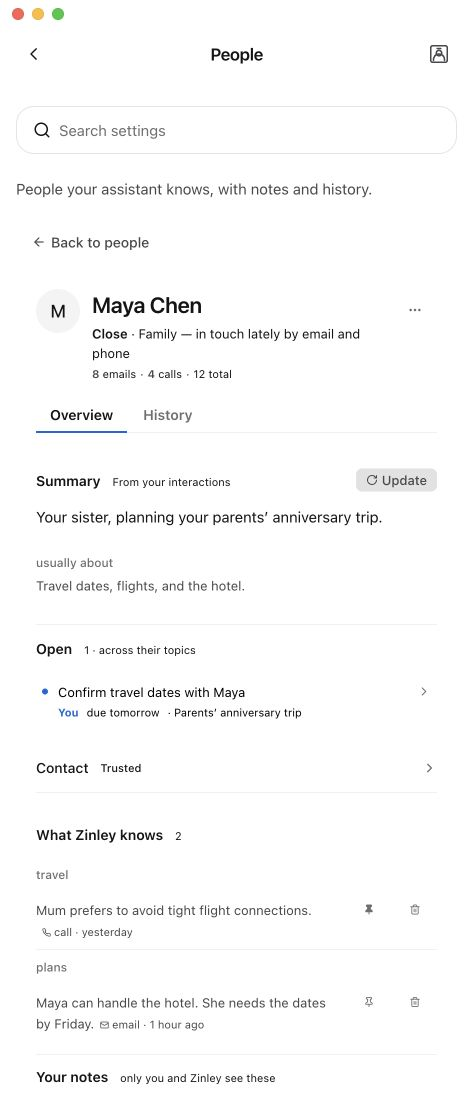
Takes care of the back-and-forth
Let Zinley compare quotes, chase refunds, or make the plans. It handles the back-and-forth with your instructions.
See how it can help
An identity of its own
Your name for it. Your choice of character and voice. Its own phone and email, shaped around you.
 Nori
NoriCall or email it. Share its contact card so your people can reach it, too.
Your preferences shape how it speaks and what it takes care of.
Choose its access, set its boundaries, and change your mind anytime.
History and receipts
Listen back. See what was spent and why. Change how it handles the next task.
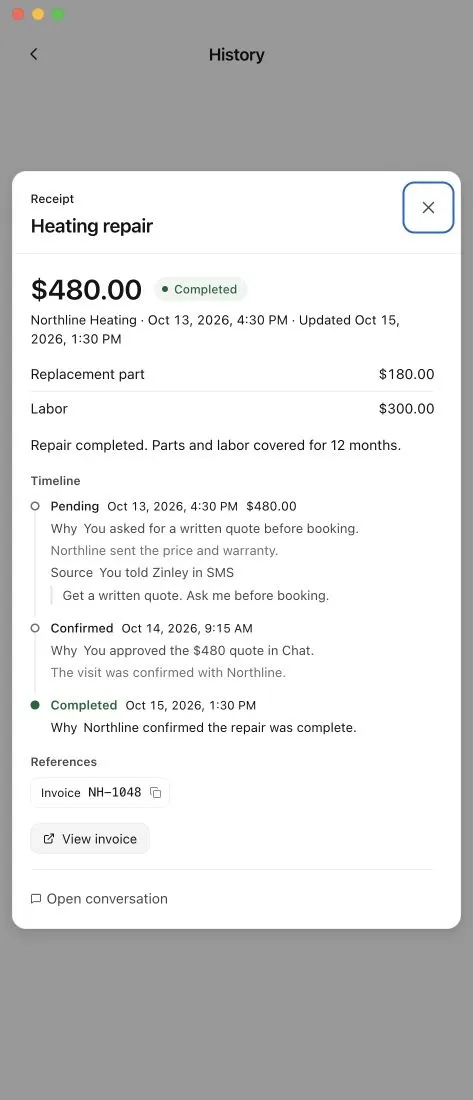
Listen back to available recordings and read the conversation transcript.
See the amount, approval, and timeline behind a purchase.
Adjust its instructions and boundaries. Guide how it handles the next task.
Leading AI models. Your connected tools. One personal AI.
Explore modelsGive Zinley a task and your rules. It can carry out the steps and follow up, including scheduled work, without you prompting every step.
Open History for calls, emails, and receipts. Call and email history depends on your plan; recordings and transcripts may expire. Receipts remain available outside that viewing window.
Connect supported apps so Zinley can work with your email, calendar, and files. On an approved computer, it can also use the apps and websites your permissions allow.
See all integrationsGive it a name, set its rules, and share its contact card. It can handle calls, emails, and requests as your AI assistant, not pretend to be you.
You choose its access and what needs your approval. Set boundaries for messages, bookings, and spending. Review important results, because AI can make mistakes.
Use the app, email, or its dedicated calling number when enabled. To text your Zinley, use the shared text line from your verified mobile number. The same assistant keeps your context across connected channels.
DownloadFor work on your computer, keep it online with Zinley running and access enabled. Zinley Computer can handle supported cloud work, but cannot access files on an offline device.
Cross-device continuityChoose a plan based on how much work you need handled. Usage limits and optional phone charges depend on your plan.
PricingMeet the personal AI you can make your own.
Get your Zinley